Appearance
Quiz Answer Submission Flow
This guide explains the complete workflows for creating and implementing both Open and InApp quizzes with the Attune API.
Open Quiz Flow
Open quizzes allow users to take a quiz without prior registration. The flow manages user identification through generated anonymous IDs.
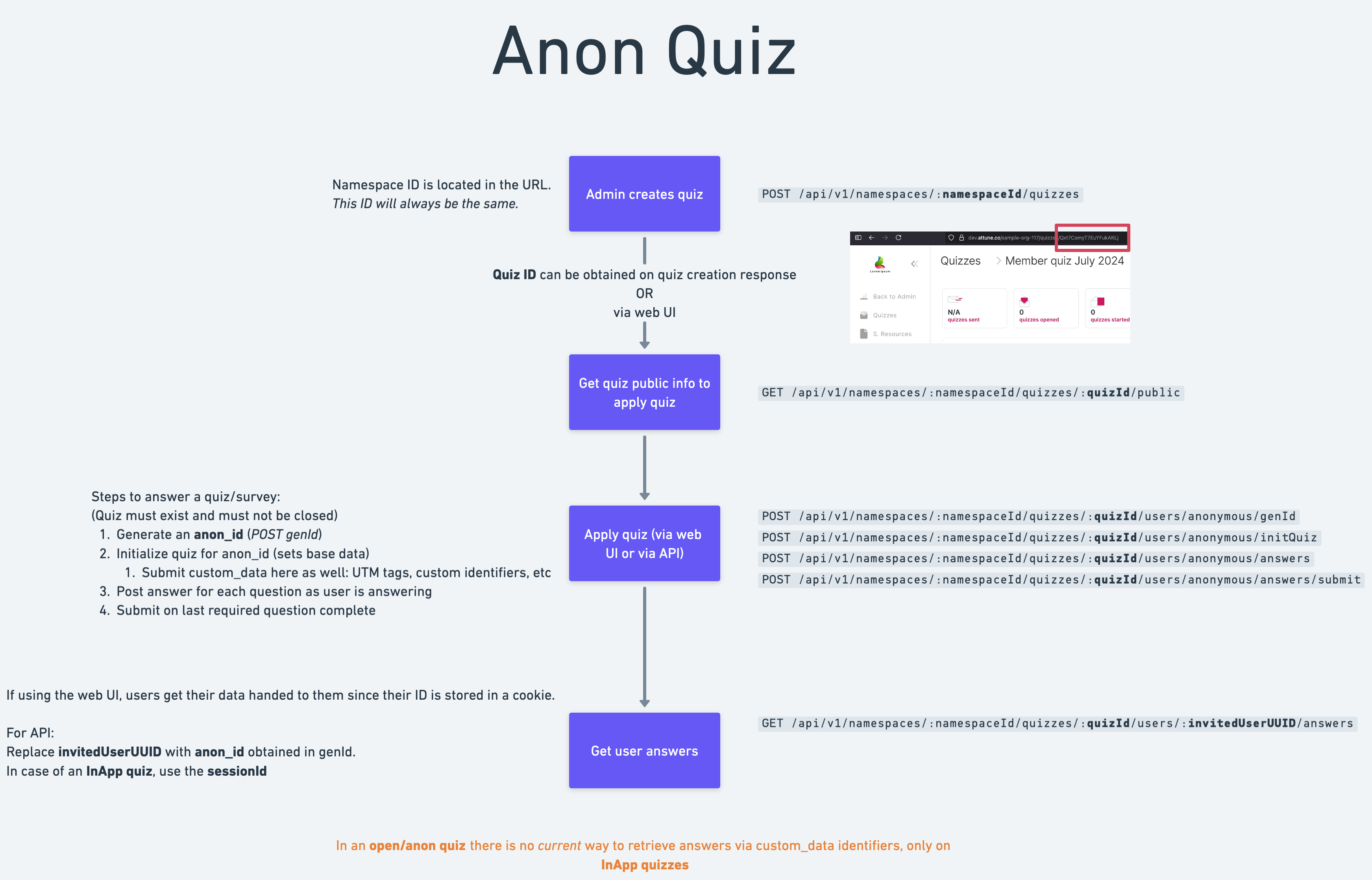
Key Implementation Steps
Admin creates the quiz via Web UI or via API - Create Quiz
POST /api/v1/namespaces/:namespaceId/quizzesObtain Quiz ID either from the creation response or via Web UI
Get quiz public info to obtain relevant quiz information via - Get Public Quiz Info
GET /api/v1/namespaces/:namespaceId/quizzes/:quizId/publicApply quiz via API by following these steps:
- Generate an
anon_idvia - Generate Anonymous User IDPOST /api/v1/namespaces/:namespaceId/quizzes/:quizId/users/anonymous/genId - Initialize quiz for
anon_id(sets base data) via - Initialize QuizPOST /api/v1/namespaces/:namespaceId/quizzes/:quizId/users/anonymous/initQuiz - Post answer for each question as user is answering via - Post Answers
POST /api/v1/namespaces/:namespaceId/quizzes/:quizId/users/anonymous/answers - Submit on last required question complete via - Submit All Answers
POST /api/v1/namespaces/:namespaceId/quizzes/:quizId/users/anonymous/answers/submit
- Generate an
Retrieve user answers if needed via - Get User's Answer
GET /api/v1/namespaces/:namespaceId/quizzes/:quizId/users/:invitedUserUUID/answers
Implementation Notes
- Important Limitation: In Open quizzes, there is currently no way to retrieve answers using custom_data identifiers (only available for InApp quizzes)
InApp Quiz Flow
InApp quizzes are designed for integration within applications where user identification and results retrieval are important.
Special Attributes
During quiz creation:
anonymousmust be set tofalseinappmust be set totrue
Key Features
- Programmatic access to user results via
sessionId - Same basic flow as Open quizzes, but with enhanced user identification
- Access to user results through both UI and API
URL Structure Differences
- Uses
/appinstead of/aqin URLs - Includes a
sessionIdparameter - No
genIdrequest necessary- Uses
/initQuizto handle required logic
- Uses
The rest of the quiz behaves in the same way as the Open type
Example URLs
User Results Retrieval:
https://dev.attune.co/sample-org-117/app/Qxt7ComyT7EuYFukAKLj?sessionId=1abe321ce312a3a1b2e3dbbAPI Data Retrieval:
https://dev.attune.co/api/v1/namespaces/sample-org-117/quizzes/Qxt7ComyT7EuYFukAKLj/users/1abe321ce312a3a1b2e3dbb/answersRestrictions
sessionIdmust be at least 5 characters long
For more detailed information on implementing each endpoint, refer to the respective API documentation sections.